


Drive Weather With Live Radar
4.6663.00 Reviews
App Specs
- Version
- 12.4.0
- Updated On
- License
- Free
- Downloads
- 100,000+
- Developer
- Concept Elements Inc
- Categories
- Weather
- Platform
- Android, iOS
Screenshots
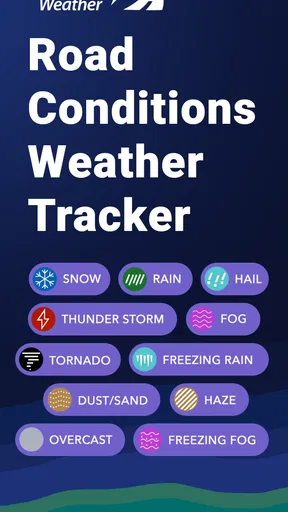
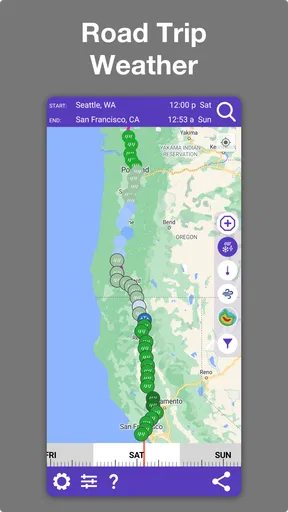
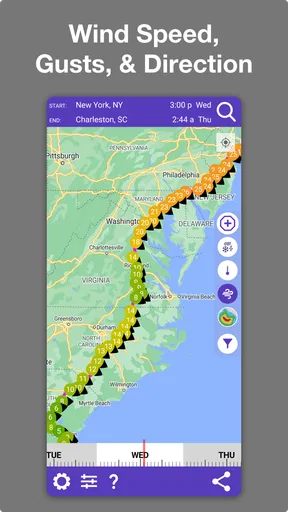
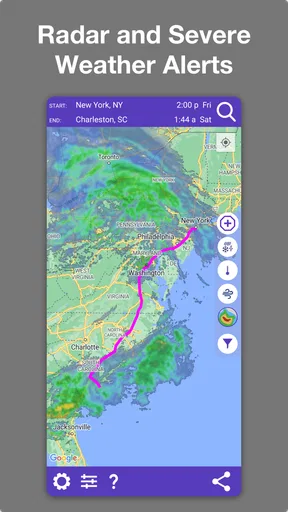
 Analysis by AppCompare
Weather can turn an ordinary drive into a string of small decisions: leave now or wait, take the exposed highway or a slower road, stop before the rain reaches you or keep going. I often find that a general forecast answers the question “What will the weather be like here?” but not the more useful one: “What could I run into between here and there?” Drive Weather With Live Radar is built around that gap. Its value is less about replacing every weather app on a phone and more about helping drivers check conditions across a journey before setting off.
That focus makes it most useful when the route matters as much as the destination. A short, familiar trip on a clear day may not need a dedicated tool; a longer drive crossing changing weather is another story. I like the idea of judging the app by whether it helps me plan with less last-minute checking, rather than expecting it to make difficult road conditions disappear. Weather information can inform a decision, but it cannot guarantee what a driver will encounter.
A route-first way to check the forecast
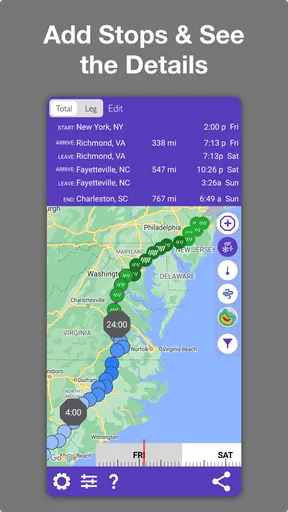
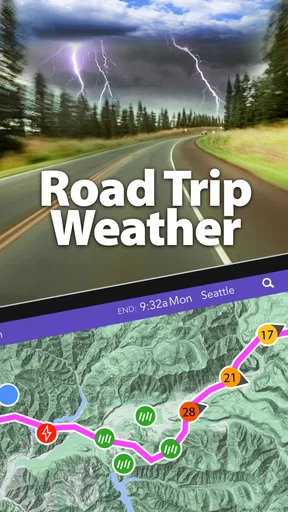
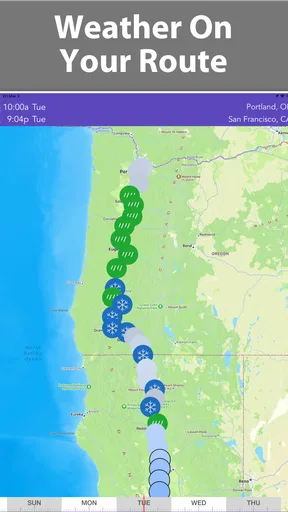
Many weather apps are organized around a current location, a saved city, or a map you inspect manually. That works well when I want to know whether to bring a jacket or plan an outdoor lunch. Drive Weather takes a more travel-oriented approach: it is designed to show weather in relation to a driving route, with radar, wind, snow, and road conditions among the information it focuses on. For someone planning a trip, that framing can save the mental work of checking several places along the way one by one.
The distinction is practical rather than magical. A route view can make a developing band of rain easier to notice in context, but it still calls for judgement. A map does not tell me that every alternative road is safer, faster, or suitable for the vehicle I am driving. I would use the overview to identify where conditions deserve attention, then decide whether to adjust timing, pause, or consult navigation—not treat a colored weather display as an instruction to take a detour.
Getting useful results before departure
The most sensible time to use this kind of app is while parked and planning, not while trying to read a screen in traffic. I would enter or review the intended journey, scan for weather changes along the way, and note the parts of the route that may need a second look before leaving. That simple habit is more useful than repeatedly opening a forecast once the trip is underway, when options may already be limited.
It also helps to think in terms of decision points rather than a single all-clear. If the forecast looks unsettled, I might compare the expected conditions near departure with those later in the trip and consider whether a short delay would change the experience. That is a planning use, not a promise that the app can optimize every departure time or predict an exact gap in a storm. The important payoff is seeing the journey as a sequence of conditions instead of assuming the weather at home will hold for the whole drive.
How it fits a real driving day
Imagine heading out for a family visit several hours away. The sky may look fine where you start, while rain or snow is possible farther along the route. A local forecast could leave you checking town after town; a route-focused view gives you a more direct way to inspect what might be ahead. I would use that information to plan a sensible stop, allow extra time, or discuss whether leaving later makes more sense, especially if the people in the car are uncomfortable driving in poor weather.
Worth Reading Before You Choose

EA SPORTS FC Mobile 26 Is a Bigger Football Game, but It Takes Time

Flipboard Shows What News Apps Must Do Beyond the Feed

Switching to Android Auto Means Rethinking Your Driving Routine

Google Calendar Makes a Crowded Week Easier to Manage

Ludo King Makes the Most of the Minutes Between Plans

Baby Panda World Brings Quick Play to Modern Phones, but Its Game Library Feels Busy
For regular commuters, the benefit is more selective. If the same short route is usually predictable, opening a dedicated travel-weather app every morning may feel like an unnecessary extra step. It becomes more valuable when a commute crosses exposed roads, when conditions change seasonally, or when a forecast suggests that rain, strong wind, or snow could affect the drive. Drivers who work on the road or make frequent longer trips are more likely to get repeat value from checking conditions along a route than someone who rarely drives beyond their neighborhood.
There is a useful trade-off here: more route context can reduce guesswork, but it also asks the driver to interpret more than a single daily icon. I would check the areas that could affect my choices, not attempt to watch every point on the route. For example, I might pay extra attention to the stretch where snow is forecast rather than spending time comparing conditions in places where the weather is expected to stay settled. That keeps planning focused and avoids turning a helpful forecast into another source of distraction.
First Impressions
The first thing that caught my eye was the user-friendly interface. It’s clean, intuitive, and doesn’t bombard you with ads every five seconds (a huge win in my book). After downloading the app, I was greeted with a simple dashboard that made it easy to plot my route and check the weather conditions along the way.
Features That Stand Out
What sets Drive Weather With Live Radar apart is its ability to provide real-time weather updates along your driving route. This isn’t just a static map with some clouds and sun icons; it’s a dynamic tool that updates as you drive, showing you what to expect in terms of precipitation, temperature, and even wind conditions. It’s like having a personal meteorologist in your pocket.
The app allows you to customize your experience by setting preferences for different weather conditions. Want to avoid icy roads or heavy rain? Just toggle your settings, and the app will highlight alternative routes. It’s all about making your drive safer and more predictable.
Under the Hood
One of the things I was curious about was how the app manages to keep its data so fresh. Turns out, it uses multiple weather data sources and integrates them seamlessly. This means you’re getting a comprehensive view, not just a snapshot from one service. The live radar feature is particularly impressive—it’s like watching a weather channel but directly on your driving route.
Another nifty feature is the app’s ability to adjust your route based on the time of day, which is particularly useful if you’re planning a long drive. It considers traffic patterns and weather conditions to suggest the best times to hit the road. Pretty smart, right?
Putting weather information to work
The strongest way to use the radar is as a planning aid, not a reason to keep glancing at the phone while moving. Before starting, I would look at the route view and identify whether a weather area is likely to intersect the drive. If conditions are changing, checking again while safely stopped can help me decide whether to continue as planned or take a break. That workflow turns the app into a preparation tool instead of a distraction.
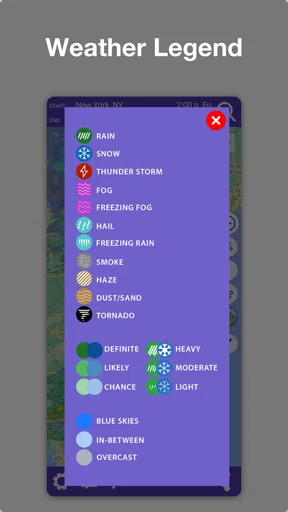
Wind and snow deserve attention beyond the obvious question of whether precipitation is falling. A driver may care about exposed stretches, visibility, or whether a winter route calls for more time and caution. The app’s emphasis on those conditions makes it more relevant to road planning than a simple sun-and-rain forecast, though the information still needs to be weighed against road signs, local advisories, and what I can see around me. I would not assume that a route suggestion accounts for every personal concern, such as comfort, vehicle capability, or a need to avoid a particular road.
Where it sits beside ordinary weather apps
A standard weather app remains the quicker choice when I only need the forecast for my current town, want a broad local outlook, or have no route to plan. A navigation app is usually the better tool for turn-by-turn directions and live traffic decisions. Drive Weather occupies the space between them: its appeal is the weather picture tied to a drive, while the other tools may be more convenient for checking one location or following directions.
I would not make it my only source for every travel decision. For a complicated journey, I would use it to spot weather concerns, then rely on a navigation tool for the actual driving route and keep an eye on official road information when conditions are severe. That division of labor is not a weakness so much as a sensible boundary: weather context and navigation are related, but they do not answer exactly the same question.
In the Driver’s Seat
Using Drive Weather With Live Radar on the road was a breeze. The app runs smoothly in the background, and the voice alerts are clear without being intrusive. I found the live updates to be incredibly accurate, which is a major plus when you’re trying to avoid getting caught in a storm.
One feature I particularly loved was the ability to share my route and weather updates with friends and family. It adds an extra layer of safety and peace of mind, especially for longer trips. Plus, who doesn’t love a good excuse to brag about their tech-savvy app?
Practical limits and sensible expectations
No weather display can remove the uncertainty that comes with changing conditions. Radar and forecasts are useful for spotting a pattern, but the situation on the road can still differ from what a map suggests. I would treat an alert as a prompt to reassess when it is safe, not as permission to push on or as proof that a road ahead is clear. A driver who needs highly specialized routing, detailed local emergency instructions, or a specific accessibility feature should check that their usual navigation and local information sources meet those needs rather than assuming this app covers them.
There is also a small planning cost: a route-based tool is most helpful when I take a moment to set up or review the route. If I only want to know whether it will rain at home in an hour, that extra context may be more than I need. For an occasional long drive, I would open it when the forecast is unsettled; for a daily short commute in stable weather, a familiar general forecast is likely quicker. That distinction helps keep the app useful instead of adding a routine check that does not change any decision.
Drive Weather is a free weather app from Concept Elements Inc, with optional in-app purchases priced from about six to twenty dollars per item. It is rated for Everyone, and its current version is 11.4.1; it requires Android 7.0 or later. The app has an average rating of 4.6 from around 1,400 ratings, with over 100,000 installs. Those figures suggest an established audience, but I would still judge it by whether route-level weather is something I will actually use. If it is, the free starting point makes it easy to see whether the workflow suits me before considering any optional purchase.
Room for Improvement?
No app is perfect, and while Drive Weather With Live Radar is close, there are a couple of areas where it could improve. Occasionally, I noticed a slight lag in loading updates, especially in areas with poor reception. It’s not a dealbreaker, but it’s something to be aware of if you’re driving in remote locations.
The app could also benefit from integrating with more navigation tools. While it works well with major apps like Google Maps and Waze, expanding compatibility could make it even more versatile.
Who will get the most from it
I would recommend trying it if you often drive between towns, plan weekend trips, or need to think about wind, snow, or rain along a longer journey. It is particularly appealing if your usual habit is to check only the forecast at the destination and then discover that the route itself has very different conditions. Seeing the trip as a whole can help you ask better questions before leaving: where might I want to pause, when should I check again, and is the current plan still comfortable?
On the other hand, someone who rarely drives far, already has a route-planning routine that answers their weather questions, or mainly wants a simple local forecast may not need another app. Drivers who expect a weather tool to guarantee safe roads or automatically resolve every navigation choice should also keep their expectations modest. I see the best fit as a driver who wants a clearer basis for planning, but is still willing to use common sense and other sources when the situation calls for them.
Final Thoughts
All in all, Drive Weather With Live Radar is a must-have app for anyone who spends a lot of time on the road. It’s a reliable companion that takes the guesswork out of travel, ensuring you can focus on the journey rather than the weather. Whether you’re a road trip enthusiast or just trying to make your daily commute a bit less unpredictable, this app has you covered.
With its combination of real-time updates, customizable alerts, and a user-friendly interface, it’s no wonder this app is gaining traction among drivers worldwide. So next time you’re planning a drive, give it a whirl—you might just find it’s the co-pilot you’ve been missing.
Pros
- User-friendly interface with clear visuals.
- Accurate weather updates in real-time.
- Customizable routes for personalized planning.
- Includes severe weather alerts for safety.
- Integrated radar maps for detailed insights.
Cons
- Premium features require a subscription.
- Limited offline functionality.
- Occasional lag in data loading.
- Ads can be intrusive in free version.
- Not all regions have detailed coverage.
FAQs for Drive Weather With Live Radar
What features does Drive Weather With Live Radar offer?
Drive Weather With Live Radar provides real-time weather updates and radar images specifically tailored for drivers. The app offers detailed forecasts, road conditions, alerts for severe weather, and customizable routes. Users can view weather changes along their planned route, ensuring safer and more informed travel decisions.
Is Drive Weather With Live Radar available for both Android and iOS devices?
Yes, Drive Weather With Live Radar is available for both Android and iOS platforms. Users can download it from the Google Play Store and the Apple App Store, allowing access to its features regardless of their device preference. Ensure your device meets the necessary system requirements for optimal performance.
Does Drive Weather With Live Radar require a subscription or is it free to use?
The app offers both free and premium versions. The free version provides basic weather information, while the premium subscription unlocks advanced features such as extended forecasts, ad-free experience, and additional customization options. Users can choose according to their needs and budget.
How accurate is the weather data provided by Drive Weather With Live Radar?
Drive Weather With Live Radar utilizes data from reliable weather services to provide accurate and timely updates. The app continuously refreshes information to ensure users receive the most current conditions. However, like all weather services, occasional discrepancies can occur due to rapidly changing weather patterns.
How does Drive Weather With Live Radar enhance driving safety?
By offering real-time weather updates and alerts along your route, Drive Weather With Live Radar helps you anticipate and avoid hazardous conditions. This foresight enables drivers to plan safer routes, adjust travel times, and avoid severe weather, ultimately enhancing overall driving safety and confidence.


